SEO Content Production Pipeline
The SEO Content Production Pipeline is an automated, AI-driven content generation engine designed to create long-form, search-engine-optimized articles that drive organic traffic and establish domain authority.
While AI powers each production stage, marketers maintain complete creative control. You can inspect stage outputs, request targeted AI regenerations with custom instructions, or approve stages to advance the pipeline.
Launching a Content Job
To start generating a new piece of SEO content, click the Generate Content button on the Content Jobs dashboard and configure the following parameters:
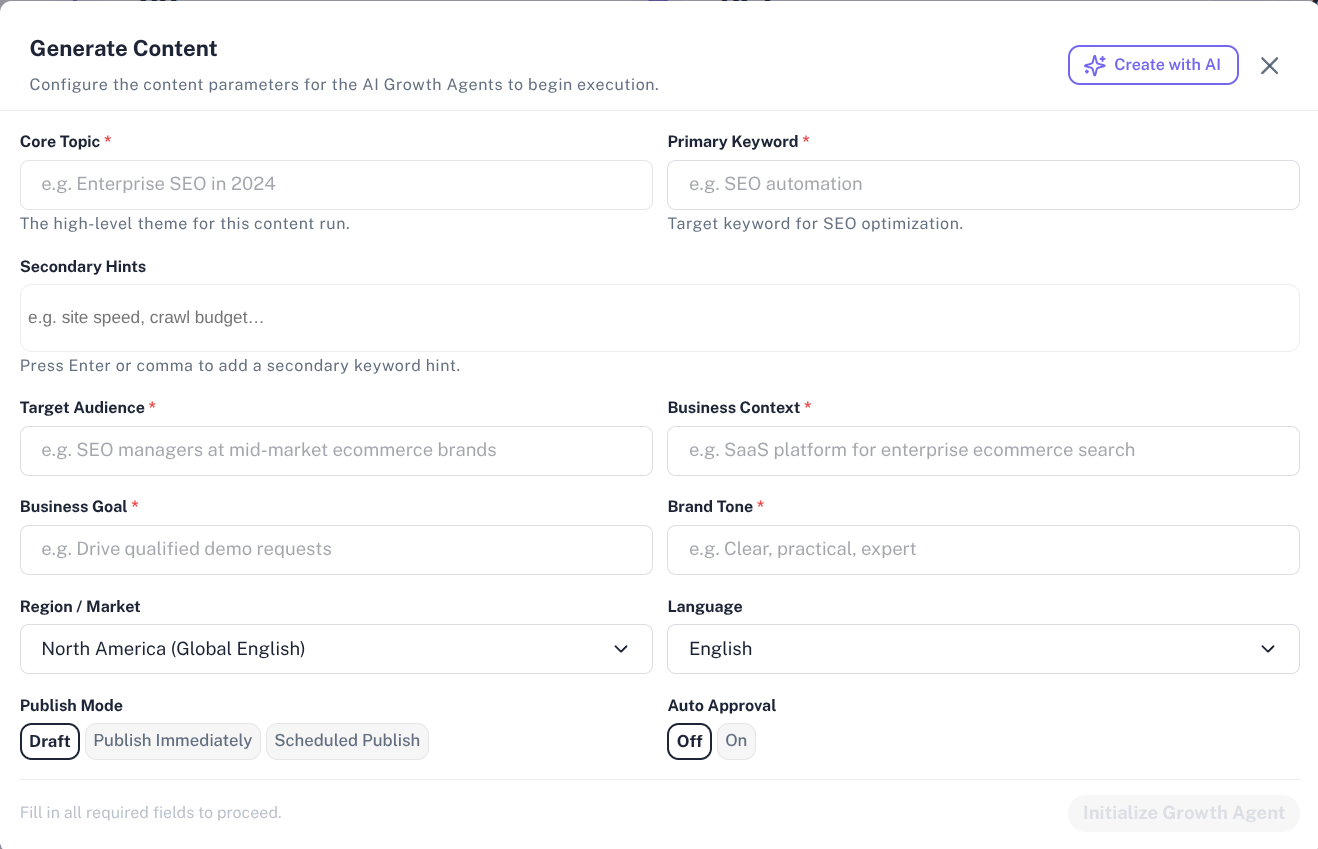
| Parameter | Description | End-User Guidance |
|---|---|---|
| Topic | The main theme or title of the article | Be specific (e.g., "How Customer Data Platforms Improve B2B Attribution"). |
| Primary Keyword | The core search term target | The principal keyword you want to rank for in search engines. |
| Secondary Hints | Supporting keywords or subtopics | Additional topics or concepts the AI should weave into the article. |
| Target Audience | Your target reader persona | Define their background and pain points (e.g., "Mid-market Marketing Directors"). |
| Geographic Region | Target country or market | Ensures localized spelling, terminology, and regional context (e.g., "US", "India"). |
| Language | Content language | Select your preferred output language. |
| Content Type | Format of the asset | Options include Blog Post, Landing Page, Product Guide, or Thought Leadership. |
| Business Context | Your brand positioning | Context about your company, value propositions, and key product capabilities. |
| Publish Mode | Publication preference | Choose Draft for manual review or Auto-Publish for automatic CMS syncing upon completion. |
⚙️ The 8 Automated Production Stages
Once launched, your content job progresses through 8 specialized AI activity stages:

1. Topic Research
The AI analyzes search intent, identifies competitor content gaps, extracts audience pain points, and outlines high-fit product positioning opportunities.
- Key Output: Search intent classification, keyword clusters, competitor gap analysis, and audience pain point mappings.
2. Content Brief
Constructs a structured blueprint for the article to ensure comprehensive coverage before writing begins.
- Key Output: Comprehensive heading outline (H1, H2, H3), primary/secondary CTA placement strategies, and internal section requirements.
3. Writer Agent
Drafts the complete, full-length content based on the approved brief, adhering to specified brand tone and audience guidelines.
- Key Output: Well-structured article draft complete with engaging intros, structured sections, and conversion-focused call-to-action blocks.
4. SEO Editor
Optimizes the raw draft for search engine visibility and reader engagement.
- Key Output: Refined heading formatting, optimized keyword density, improved readability scoring, and meta title/description suggestions.
5. Fact Checker
Audits the content against factual guardrails and business guidelines to eliminate hallucinations or unsupported claims.
- Key Output: Fact-checking verification report, evidence flags, and compliance validation.
6. Internal Linking
Scans the article and recommends relevant internal site links and resource recommendations to build site architecture and SEO authority.
- Key Output: Contextual internal link insertions and suggested anchor text mappings.
7. Quality Gate
Evaluates the overall piece against stringent quality metrics, readability benchmarks, and SEO standards before publication.
- Key Output: Comprehensive quality score (0–100) and automated pass/fail verification.
8. Draft & Publish
Converts the final polished article into clean markdown and exports or publishes it to your connected content management system (CMS).
- Key Output: Strapi CMS payload, publication confirmation, and final formatted preview.
🖐️ Managing Approval Gates & Regenerations
Every content job provides an intuitive stage detail workspace:
- Inspecting Stage Outputs: Click on any stage badge in the pipeline progress bar to review the generated JSON intelligence, rendered markdown, or quality scores.
- Requesting Regenerations: If a stage output requires adjustments, click Regenerate, enter your custom instructions (e.g., "Make the introduction more conversational"), and the AI worker will update that specific stage.
- Approving Stages: Click Approve Stage to lock in the stage output and trigger the downstream AI worker for the next stage.